Best video formats · Business coaches · Last updated November 2026
Best Video Formats for Business Coaches
Formats help turn your expertise into clear, watchable videos. A video format is a recognizable on-screen structure, such as a Tier List or Do & Don’t, not a dimension like 9:16 or a file type like MP4. Here are the formats that suit business coaches, with examples and how to make each one.
Three formats to try
The short answer
For business coaches, the strongest formats are Do & Don’t for a habit and its opposite, 2 Column for clear distinctions between habits, Tier List for ranking options such as ways to get your first clients, 3 Column for sorting decisions into categories, and Green Screen for case studies, news and public posts. A plain talking head with B-roll suits a single client question. No format guarantees views; it makes the shift easier to see.
- Changing a habit? Use Do & Don’t.
- Making a clear distinction? Use 2 Column.
- Answering one question? Use a talking head.
Quick pick: which format for which video
| Format | Best for | Skip it when |
|---|---|---|
| Do & Don't | You are swapping a habit or phrase for a better one. | The change is a mindset with no clear action attached. |
| 3 Column | You are sorting options into three meaningful categories. | You have no real reason behind each call. The reasons are what make the video interesting. |
| 2 Column | You want to make a clear distinction between two sides. | You want to explore one idea in depth; a talking head suits that better. |
| Tier List | You want to rank several options and explain why. | The topic is sensitive, such as burnout or grief, where a ranking would feel flippant. |
| Green screen | You are breaking down a business story, a trend or a public post. | The response would be about the person rather than the idea. |
| Talking head with B-roll | The video is one question or one story. | You are comparing or sorting several items. |
1. Do & Don't
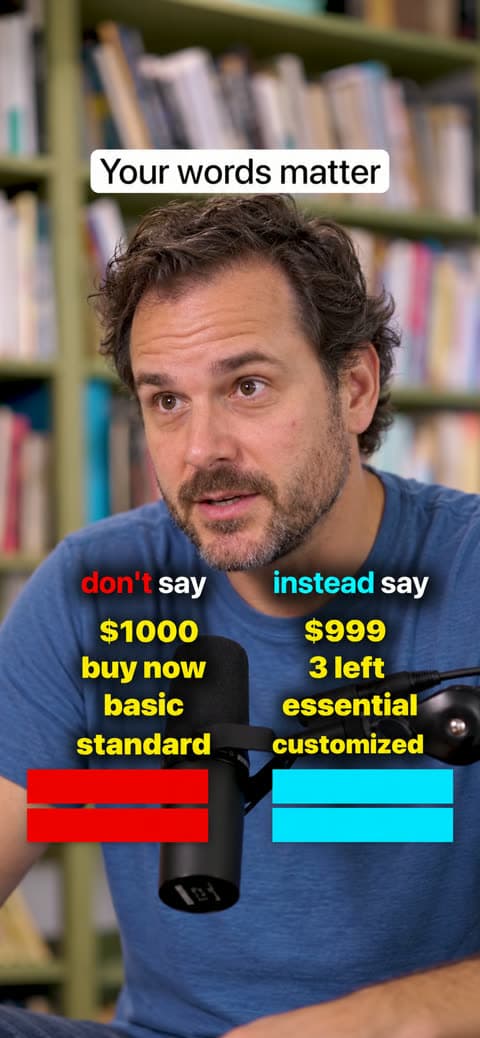
Much of business coaching is replacing one habit with another. Do & Don’t shows both sides in one glance.
- What the viewer sees
- Two columns of pairs. Each “don’t” appears with its matching “do” as you say it.
- Example for business coaches
- “Don’t: plan the week on Monday morning. Do: plan it on Friday afternoon.” Four planning habits in one video.
- Use it when
- You are swapping a habit or phrase for a better one.
- Skip it when
- The change is a mindset with no clear action attached.
2. 3 Column
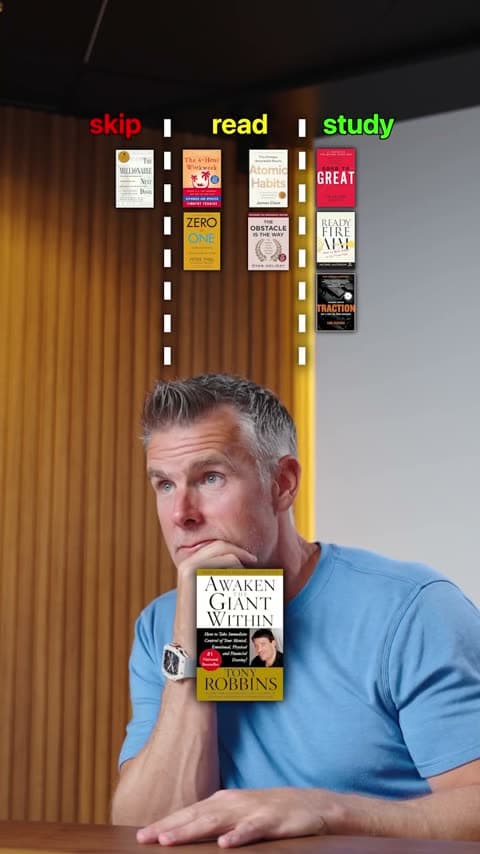
Use it to sort options into three meaningful categories, such as do, delegate and drop. The insight comes from explaining why each one belongs where it does, which shows how you help clients decide.
- What the viewer sees
- Three columns with meaningful labels, such as do, delegate and drop. Each item drops into its column as you explain your call.
- Example for business coaches
- Tasks a business owner still does themselves, sorted into do, delegate and drop, with the reason for each call.
- Use it when
- You are sorting options into three meaningful categories.
- Skip it when
- You have no real reason behind each call. The reasons are what make the video interesting.
Try a format on your next coaching idea
Record yourself talking, pick a Format, and Jupitrr builds it from what you say.
3. 2 Column
Use it to make a clear distinction, such as myth or fact or keep or cut. Each item goes on one side, and you explain why. Keep or cut is a quick way to challenge a habit.
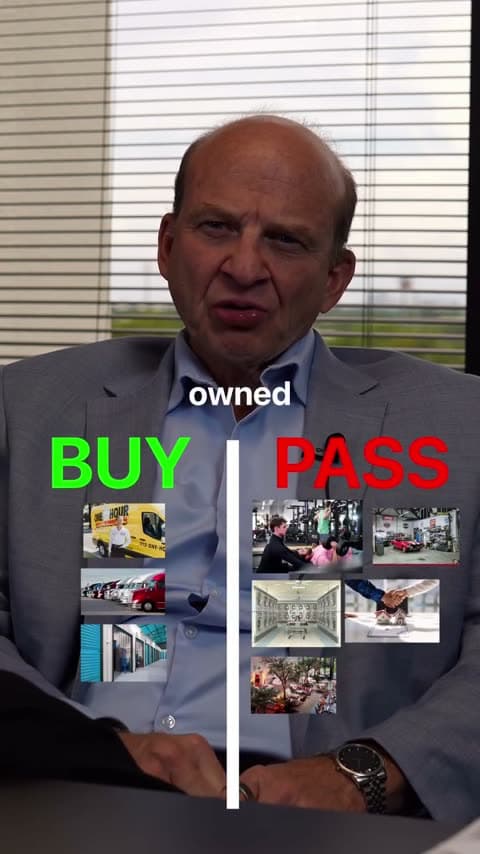
- What the viewer sees
- Two columns, such as Keep and Cut. Each item drops into its side as you give your verdict.
- Example for business coaches
- Five work habits sorted into Keep and Cut, with the reason for each call.
- Use it when
- You want to make a clear distinction between two sides.
- Skip it when
- You want to explore one idea in depth; a talking head suits that better.
4. Tier List
One of the most popular video formats right now. Use it to rank options and defend your judgment, placing each item in a tier while you explain why. Ranking practical options gives new business owners a clear place to start.
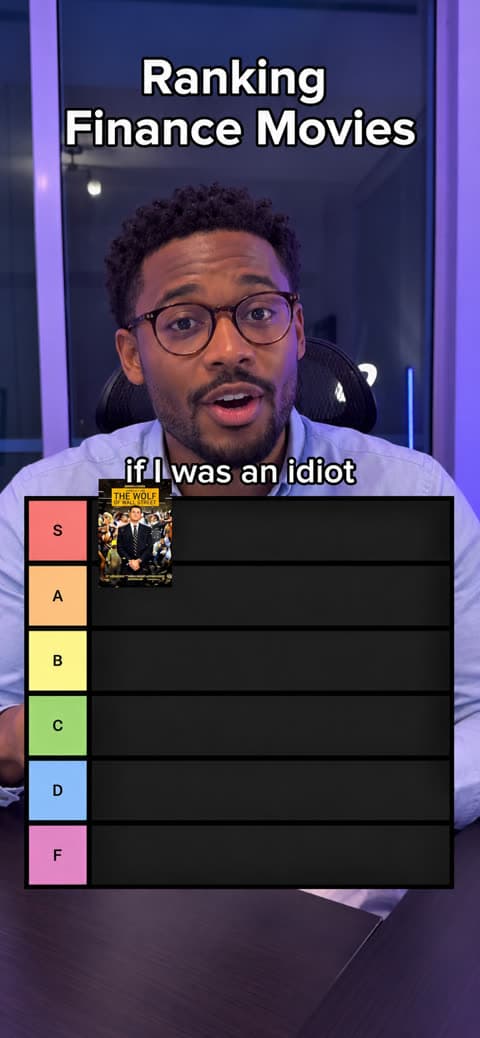
- What the viewer sees
- A tier board below you. Each item is placed into its tier as you explain why it belongs there.
- Example for business coaches
- Ways to get your first clients, such as referrals, workshops and cold outreach, ranked from easiest to hardest for a new coaching business.
- Use it when
- You want to rank several options and explain why.
- Skip it when
- The topic is sensitive, such as burnout or grief, where a ranking would feel flippant.
5. Green screen
Suits investigations and case studies of a company or topic, where screenshots and B-roll carry the story, and it works well for news. The changing background adds variety to longer videos, and the cutout works on videos up to 10 minutes. Jupitrr places matched B-roll behind you automatically; you add any specific screenshots yourself. Use it to respond to hustle advice with the post behind you.

- What the viewer sees
- You cut out of your background, in front of the screenshots, headlines or B-roll you are talking about.
- Example for business coaches
- A coach stands in front of a viral “wake up at 4am” post and explains what actually gives their clients more energy.
- Use it when
- You are breaking down a business story, a trend or a public post.
- Skip it when
- The response would be about the person rather than the idea.
6. Talking head with B-roll
Most coaching moments are one question. A talking head with subtitles and B-roll keeps the focus on you.
- What the viewer sees
- You talking to camera, with subtitles and short B-roll clips that illustrate your words.
- Example for business coaches
- “The question I asked a client this week that changed their hiring plan.”
- Use it when
- The video is one question or one story.
- Skip it when
- You are comparing or sorting several items.
Coaching videos that need a different tool
Recorded group sessions, live Q&As and long webinars are better captured in your meeting or webinar tool. Short clips cut from them, with consent, can then become talking-head videos.
Jupitrr Formats are built for vertical talking-head videos under 3 minutes, or up to 10 minutes for Green screen. Longer recordings get the standard edit with subtitles, B-roll and music.
How to choose a format
- Replacing a habit? Do & Don’t.
- Making a clear distinction? 2 Column.
- Ranking options against clear criteria? Tier List.
- Sorting options into three categories? 3 Column.
- Breaking down a story, post or news item? Green Screen.
- One question or story? Talking head with B-roll.
Frequently asked questions
A video format is a recognizable structure for your video, such as a Tier List or Do & Don’t. It helps because you start from a shape viewers already understand, so you only need to bring your knowledge. For your first post, pick a question clients always ask, choose the format that fits it and record your answer.
A business coach should start with Do & Don’t: swapping a bad habit for a better one shows how you coach. If it does not feel like you, try another one. The right first format is the one you will actually record.
These Jupitrr formats start with you talking to camera. A phone and one clear idea are enough. You can use them alongside other content such as live Q&As and written posts.
You do not have to edit your video before you use a format. Upload your raw footage and choose a format. Jupitrr builds the edit automatically, ready for you to review and adjust. You can trim mistakes or remove silence first if you want to, but you do not have to.
Choose a format and topic, outline or script your points, record yourself talking, then upload your footage and select the format in Jupitrr. Review the automatic edit, adjust it and export.
Trying one or two video formats a week is a good starting point, not a rule. You do not need every format to gain traction. Repeat what works for your audience, and keep more than one format in rotation if it suits you.
A talking-head video is the base for every format. A plain talking head with subtitles and B-roll is the simplest structure; formats such as Do & Don’t or Tier List add an on-screen layer on top of you talking.
Video formats work on LinkedIn. Jupitrr Formats are built for vertical short videos, which LinkedIn, Instagram, TikTok and YouTube Shorts all support.
No format guarantees views. A format makes a habit or decision easier to see, but the insight is what people remember.
Make the shift visible
Choose a Format like Do & Don’t or Tier List, and Jupitrr builds the edit automatically, ready for you to review and adjust.