jupitrr logo

By the Jupitrr team · Last updated November 2026

Best Video Editors for Agencies

For agencies producing recurring founder-led or expert-led videos, Jupitrr AI is our pick for an automatic, editable first cut. VEED suits teams managing multiple client brand kits, Descript suits transcript-based reviews, and Vizard suits repurposing long recordings. Compare six tools below on brand settings, seats, editing, clipping, publishing and source footage.

Top picks at a glance

Choose Jupitrr AI when your agency needs talking-head recordings turned into first cuts with B-roll, subtitles, a hook and music. Choose VEED for multiple brand kits, Descript for transcript-led editing, Vizard or OpusClip for clipping workflows, and Canva for video alongside other client creative.

How we chose: This guide is published by Jupitrr AI. We compared documented workflows and plan information for six tools, focusing on recurring social video for agency clients. It is a feature comparison, not a timed hands-on benchmark. Vendor sources are linked below and were reviewed on 18 November 2026. Where a price could not be verified, we link to the provider rather than quote an estimate.

How the tools compare

  • Jupitrr AI

    Per-client brand settings
    Custom brand kit per workspace on Team
    Shared workspace
    5 seats on Team
    Editing model
    Automatic first edit
    Long-form to shorts
    AI clipping
    Publishing
    Scheduling on Pro and Team
    Source footage
    Your footage plus Getty-licensed B-roll
  • VEED

    Per-client brand settings
    Multiple brand kits on Pro, Studio and Enterprise
    Shared workspace
    Each workspace member is a paid seat
    Editing model
    Browser editing with AI tools
    Long-form to shorts
    Clip tools built in
    Publishing
    Export for your publishing workflow
    Source footage
    Your footage and stock media
  • Descript

    Per-client brand settings
    Brand Studio on Business
    Shared workspace
    Up to 5 people on Business, billed separately
    Editing model
    Transcript editing and Underlord AI
    Long-form to shorts
    Clip suggestions
    Publishing
    Direct YouTube publishing and export
    Source footage
    Your footage and stock media
  • Vizard

    Per-client brand settings
    Brand kit on Business
    Shared workspace
    Shared workspace, seats billed per head
    Editing model
    Automatic clipping
    Long-form to shorts
    Built for exactly this
    Publishing
    Posting to connected accounts
    Source footage
    Your long-form recordings
  • OpusClip

    Per-client brand settings
    Brand templates
    Shared workspace
    2 seats on Pro
    Editing model
    Automatic clipping
    Long-form to shorts
    Built for exactly this
    Publishing
    Scheduling built in
    Source footage
    Your recordings plus AI/stock B-roll on Pro
  • Canva

    Per-client brand settings
    100 brand kits and approvals on Business
    Shared workspace
    Business billed per person
    Editing model
    Templates and AI video tools
    Long-form to shorts
    AI highlights and auto-trim
    Publishing
    Content planner
    Source footage
    Stock library plus your own

Plan information reviewed on 18 November 2026. Included seats and separately billed seats are distinguished below. Prices are in USD where quoted; check the linked sources for current limits.

Sources and plan details

Reviewed on 18 November 2026. Check current allowances before budgeting for client work.

Jupitrr plans and seats

Team includes 5 seats in a shared workspace. Brand settings and billing belong to the workspace; ask us about setup and pricing for separate client workspaces. View Details

VEED brand kits

Current plan availability for multiple brand kits. View Details

VEED billing

Each workspace is billed separately and every member counts as a seat. View Details

VEED pricing

See current rates for your billing cycle. View Details

Descript plans

Compare paid seats, Brand Studio and AI allowances. View Details

Descript Underlord

AI editing alongside transcript controls. View Details

Descript publishing

Direct YouTube publishing alongside file export. View Details

Vizard plans

Compare credit allowances and additional team-seat charges. View Details

OpusClip plans

Compare included seats, brand templates and billing cycles. View Details

Canva plans

Compare Business brand kits, approvals and per-person billing. View Details

Canva AI highlights

How Highlights and auto-trim shorten existing footage. View Details

The best options in detail

Jupitrr AI logoJupitrr AIBest for recurring founder-led and expert-led talking-head videos

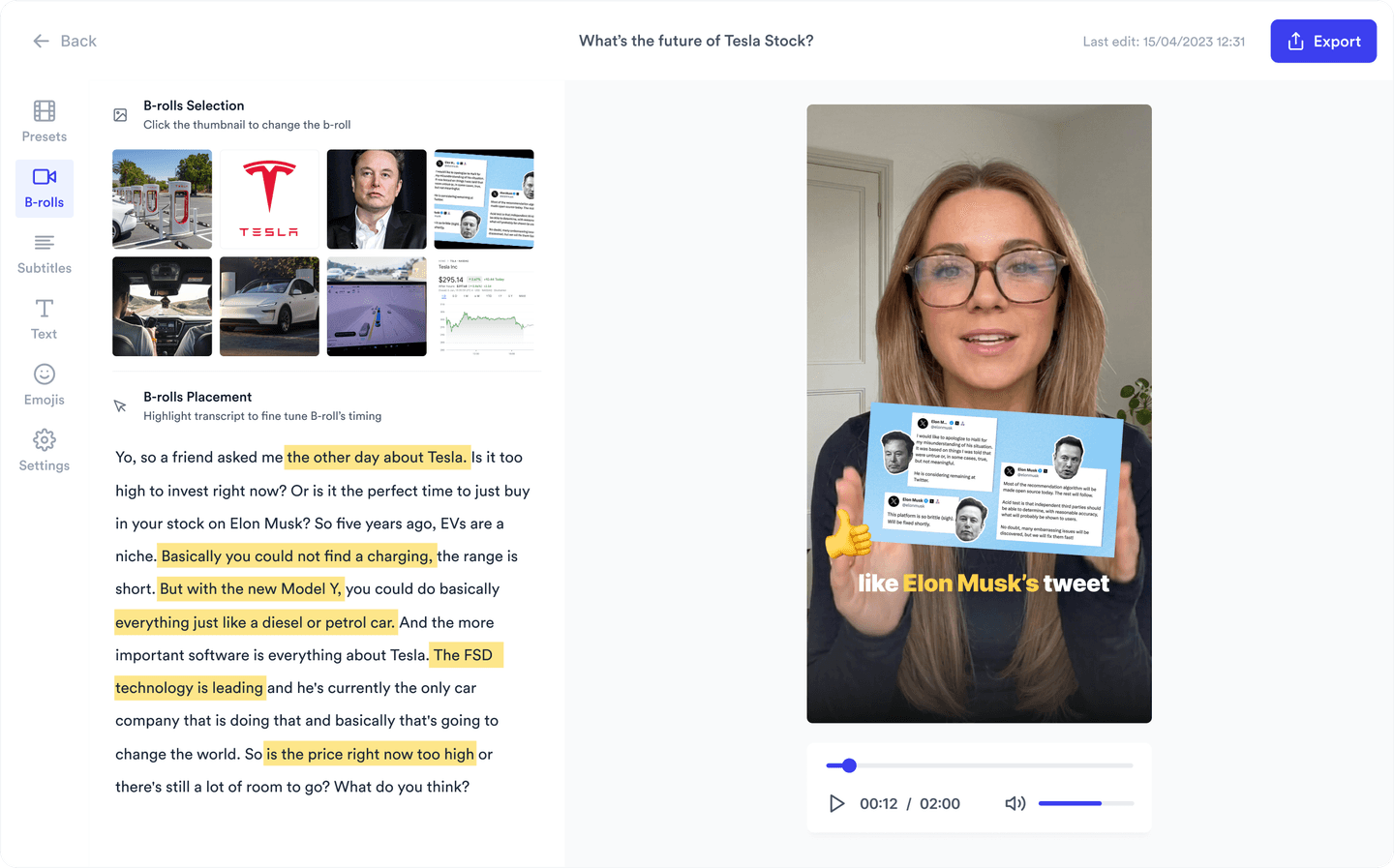
For recurring founder-led and expert-led social videos, Jupitrr AI takes the client recording and returns an editable first cut. The AI video editor places Getty-licensed B-roll against what is actually being said, adds subtitles in 64+ languages, a hook, music and sound effects.

The rest of the retainer workflow sits in the same place: AI scripting for the client to approve before a shoot, AI clipping for shorts out of a longer recording, brand kit for colours, fonts and logo, then scheduling and analytics for connected YouTube and Instagram accounts. There is also an MCP server if you drive production from your own tooling.

Strengths

  • Talking-head footage comes back edited rather than queued for an editor
  • B-roll matched to the words, not dropped on every sentence
  • Scripting, clipping, scheduling and analytics in one workflow
  • Brand kit, and 5 seats on Team for a pod working across clients
  • Browser-based with an MCP server for agencies automating their own pipeline

Tradeoff

It is built around someone talking to camera, so it is the wrong tool for product spots, motion graphics or ads with no presenter, and there is no free plan.

Pricing: No free plan; try a sample video free. From $11/mo billed annually. Team is $89/mo billed annually with 5 seats.

Best suited for: Agencies producing a steady stream of founder-led or expert-led social video and wanting the edit off the team’s plate.
Take the talking-head edit off your team

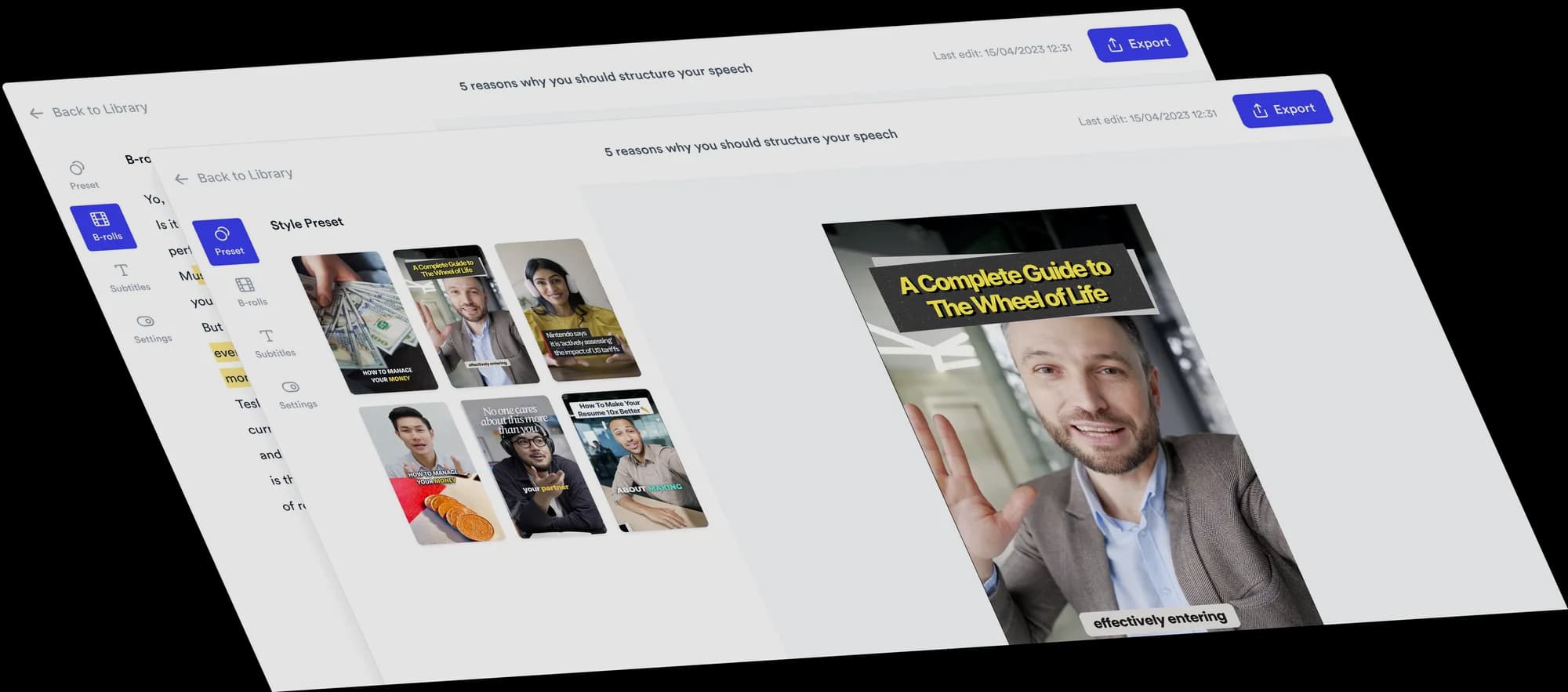
Upload a client recording and get back an edited video with B-roll, subtitles and a hook. Five seats on Team.

Jupitrr AI editor showing an automatically edited talking-head video

VEED logoVEEDBest for keeping each client’s brand kit separate

VEED supports multiple brand kits on Pro, Studio and Enterprise, so editors can keep client fonts, colours, logos and reusable assets together. Each workspace member counts as a paid seat, which matters when adding contractors or client contacts.

Everything runs in the browser, so a freelancer you add for a project can work in the shared editor. Manual timeline controls sit alongside AI tools such as automatic captions and silence removal.

Strengths

  • Centralised brand kits so every deliverable matches the client
  • Team folders that keep client work separated
  • Browser-based, so contractors onboard in minutes
  • Auto-subtitles and translation across many languages
  • Recorder with teleprompter for client-facing walkthroughs

Tradeoff

Every collaborator in a paid workspace affects the bill, and separate workspaces are billed separately. Compare that cost with using multiple brand kits in one workspace.

Pricing: Paid workspaces are billed per seat. Pro, Studio and Enterprise support multiple brand kits. See the linked pricing and billing sources for current rates.

Best suited for: Agencies whose pain is brand consistency and handovers across several clients at once.

Visit VEED's website

Descript logoDescriptBest for review-heavy edits a client signs off line by line

Some clients, particularly regulated ones, review the words rather than the video. Descript suits that because the transcript is the timeline: a compliance reviewer can strike a sentence and the footage follows, with no round trip to an editor.

Underlord can make edits from instructions, while filler-word removal, Studio Sound and screen recording support interviews and walkthroughs. Comments keep feedback alongside the project.

Strengths

  • Edit by editing the transcript, which clients can follow
  • Comments and review inside the project
  • Filler-word and silence removal in one pass
  • Studio Sound rescues audio recorded in a client’s office
  • Screen recording for walkthrough and demo work

Tradeoff

Budget for each paid editor and for media-hour and AI-credit allowances. Transcript editing and Underlord still need a final review of names, meaning and visuals.

Pricing: Business supports up to 5 people, billed separately. Free and other paid plans are available; see current pricing for rates and media-hour and AI-credit allowances.

Best suited for: Agencies with word-level client approval cycles, or heavy interview and podcast work.

Visit Descript's website

Vizard logoVizardBest for clipping long client recordings at scale

A large share of agency video input is already recorded: webinars, panels, internal town halls, podcast episodes. Vizard exists to turn that into social cuts, and the Business tier adds the shared workspace, brand kit and connected social accounts an agency needs to run it for more than one client.

Team seats cost extra on Business. Model the credits, team members and connected accounts you need across your client roster.

Strengths

  • Built specifically for long-form to short-form
  • Shared workspace and brand kit on Business
  • Many connected social accounts for multi-client posting
  • Credit options for different volumes of client footage
  • Unlimited storage on the business tier

Tradeoff

For repurposing work, start with client recordings that contain usable standalone moments. Budget separately for producing those recordings and reviewing the resulting clips.

Pricing: Free plan available. Creator and Business pricing depends on credits and billing cycle; Business team members cost extra per seat. See current pricing for a quote at your usage level.

Best suited for: Agencies whose clients already produce long recordings every week.

Visit Vizard's website

OpusClip logoOpusClipBest for high-volume captioned shorts

OpusClip focuses on repurposing: feed it a long video, get back ranked vertical clips with captions and a brand template applied. For an agency filling a content calendar quickly, that is often exactly the deliverable.

Scheduling is built in, so clips can go out without a second tool, though seat limits on the published tiers mean a larger team ends up talking to sales.

Strengths

  • Fast, high-volume clipping with a virality score to triage
  • Brand templates applied across a batch
  • Scheduling included
  • Free plan for testing a client before you quote
  • Low entry price per clip produced

Tradeoff

Pro includes 2 seats and 2 brand templates. Agencies with more editors or client brands should check larger-team options and review each clip for context.

Pricing: Starter is $15/mo billed monthly. Pro is $29/mo billed monthly or $174/year ($14.50/mo), with 2 workspace seats. See pricing for credits and larger-team options.

Best suited for: Agencies committing to a high posting cadence where speed beats bespoke.

Visit OpusClip's website

Canva logoCanvaBest for video beside the rest of the client’s creative

Plenty of agencies already run client creative in Canva, and for them the honest answer is that video does not need to move. Brand kits per client, approvals and shared folders are the same ones the carousels and decks already use.

Canva combines template-based editing with AI tools, including Highlights, auto-trim and Magic Video. Check input limits for the workflow you plan to use with longer client recordings.

Strengths

  • Per-client brand kits and approval flows already in place
  • Video, decks, carousels and statics in one account
  • Very large template and stock library
  • Content planner for scheduling
  • The easiest tool to hand to a non-editor on the account team

Tradeoff

Check the input and duration limits of its AI tools against your client recordings. It is a strong fit when video needs to share a workspace with decks, carousels and other designs.

Pricing: Free and Pro plans are available. Business is billed per person and includes 100 brand kits and approvals. See current pricing for your location and billing cycle.

Best suited for: Agencies whose creative work already lives in Canva and includes video, decks and social graphics.

Visit Canva's website

Other tools we considered

  • HeyGen: Worth evaluating when the brief calls for avatar-led videos or localisation.
  • Submagic: Worth evaluating for short-form caption styling; check its current team and brand-management limits against your client roster.
  • Adobe Premiere Pro: Worth considering for complex timelines, custom motion graphics and detailed finishing, especially when your team already edits in Adobe.
  • Kapwing: Another browser-based option to evaluate if your team needs collaborative editing and repurposing.

How to choose the right tool

Jupitrr AI logo

You produce recurring founder-led or expert-led talking-head videos and want an automatic first cut your team can review and adjust.

Choose Jupitrr AI
VEED logo

You need multiple client brand kits in a browser editor with both manual controls and AI tools.

Choose VEED
Descript logo

Clients approve video at the level of individual sentences, or your work is interview-heavy.

Choose Descript
Vizard logo

Your clients already record long sessions every week and you need social cuts from them.

Choose Vizard
OpusClip logo

You have committed to a high posting cadence and need clips out fast.

Choose OpusClip
Canva logo

Client creative already lives in Canva and video is design-led rather than footage-led.

Choose Canva

Frequently asked questions

Jupitrr AI is our pick for agencies producing recurring founder-led and expert-led talking-head videos. It creates an editable first cut with B-roll, subtitles, a hook and music. VEED suits multiple client brand kits, Descript suits transcript-based review, and Vizard or OpusClip suit clipping long recordings. Choose around the deliverable your team produces most often.

VEED supports multiple brand kits on Pro, Studio and Enterprise. Canva Business includes 100 brand kits and approvals. Descript Business includes Brand Studio, and Vizard Business includes a brand kit. Jupitrr shares a brand kit across a workspace. If you need separate client workspaces, contact Jupitrr about setup and billing before assuming one Team subscription covers them all.

Jupitrr Team includes 5 seats. OpusClip Pro includes 2 workspace seats. Descript Business supports up to 5 people, with each billed separately. VEED charges for each workspace member, Vizard Business charges extra for invited team members, and Canva Business is billed per person. Compare the total for your actual team, not just the headline subscription price.

For talking-head content, largely yes, provided someone reviews it. Jupitrr AI returns a complete first edit with B-roll matched to the script, subtitles, a hook and sound effects, and everything on the timeline can be changed before it goes to the client. For ads, motion graphics or anything with no presenter, you still want a human editor in a conventional tool.

Jupitrr supports scheduling to LinkedIn, YouTube, Instagram and TikTok on Pro and Team. Publishing to multiple client accounts requires Team. OpusClip, Vizard and Canva also offer publishing or scheduling features, while Descript supports direct YouTube publishing. Check supported networks, account limits and permissions before choosing a scheduler for several client brands.

Watermark-free exports and a white-labelled client portal are different requirements. For deliverables, check that your plan removes the editor watermark and that any stock assets are licensed for the intended use. For client access, check guest permissions, project visibility, paid-seat charges and whether custom portal branding is supported. A watermark-free export alone does not provide a white-labelled workspace.

Edit less, ship more per client

Jupitrr AI turns client talking-head footage into an editable first cut with B-roll, subtitles and a hook.

Jupitrr AI dashboard