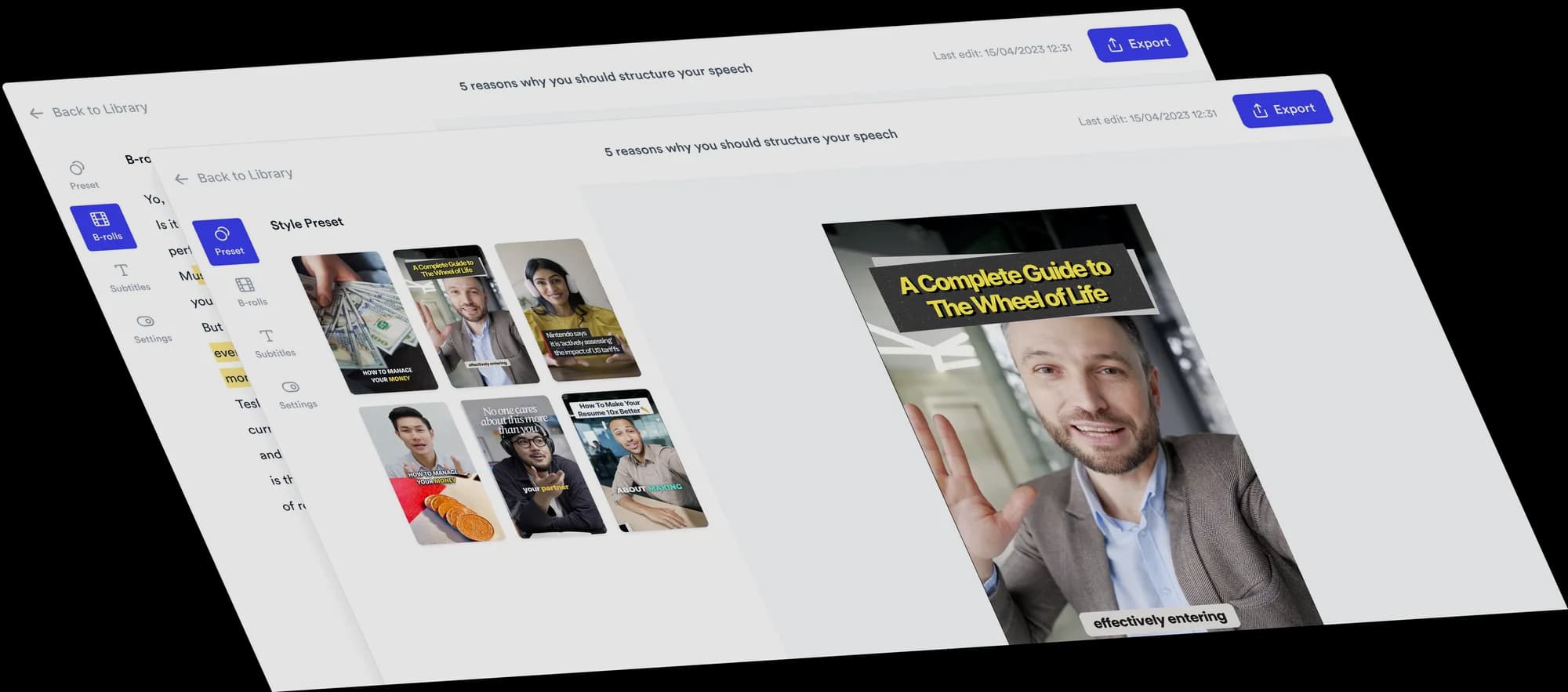
Turn your advice into a Do & Don't video
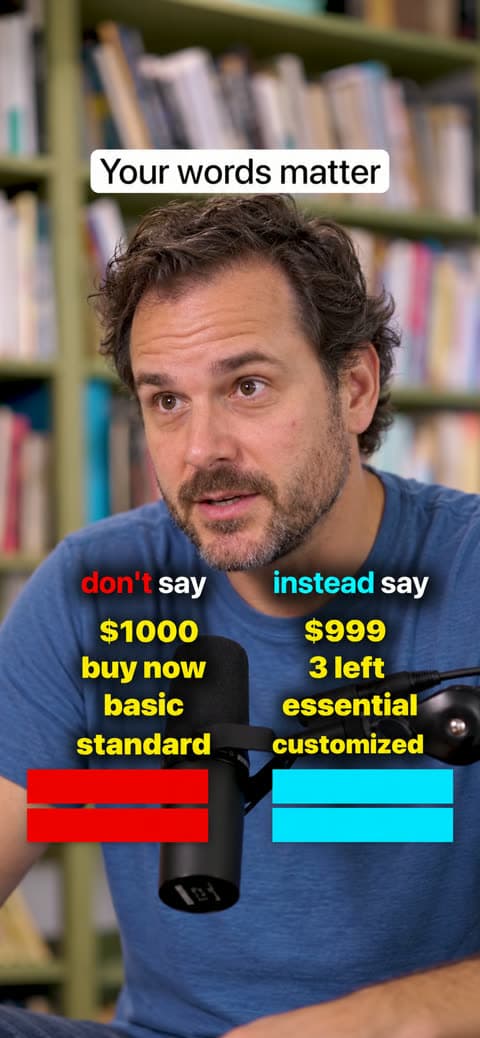
A Do & Don't video puts the common mistake and the better option side by side, word by word. Think "don't say / instead say" or "stop / start". Jupitrr finds each contrast in your recording and reveals both sides on a two-column board at the moment you say them.
 Trusted by 200K+ coaches and consultants





How a Do & Don't video comes together
You say the pairs. Jupitrr builds the board and times every reveal to your words.
- Step 1
Record your pairs and choose the Format
Record yourself saying what not to do and what to do instead, then choose Do & Don't as the Format in "Set up your video". The board owns the screen, so automatic B-roll, emojis and transitions start off.
- Step 2
Jupitrr finds each pair
It reads your transcript for contrasts like "don't say X, say Y" or "stop X, start Y", writes a short label for each side and reveals it on the exact word you say it. Column titles follow your framing, such as "don't say / instead say" or "Stop / Start".
- Step 3
Check the pairs, then export
Edit any label, change a reveal time, remove a pair or add one at the playhead. Set the titles, colours, size and position of the board, and export.
Why Do & Don't videos are easy to follow
A contrast is one of the quickest ways to teach. It makes each lesson land in a few seconds.
Viewers recognise their own mistake
The left column names what many people already do, which is what makes the advice feel personal.
The fix is right beside it
Each better option sits on the same row as the mistake, so viewers do not have to remember anything.
A reason to keep watching
Rows are covered until you say them, so the board fills in pair by pair as the video plays.
Topics that suit Do & Don't
Wording and phrases
What to say instead on sales calls, in emails or in interviews.
Habits and routines
A common habit paired with the one you recommend.
Common mistakes
What beginners in your field do, and the better option.
Simple swaps
One choice replaced by another, such as food, tools or settings.
Who Do & Don't suits
Coaches
Correct the phrases, habits and decisions your clients get wrong most often.
Consultants
Show the common approach next to the one you recommend.
Educators and trainers
Turn common errors into a quick, rewatchable lesson.
Sales coaches and copywriters
Share better wording for calls, emails, ads and pages.
Do & Don't video ideas
The Format suits any advice that comes as a swap: a phrase, a habit, a setting or a decision.
- Sales coach
Words that cost you the deal
“Stop saying these five things on sales calls.”
- Recruiter
Interview answers to replace
“Don't say this in an interview. Say this instead.”
- Copywriter
Weak phrases and stronger ones
“Your website copy is too polite. Here is the fix.”
- Nutrition coach
Easy food swaps
“If you want more protein, make these swaps.”
- Manager or leadership coach
Feedback phrasing
“How to give feedback without sounding harsh.”
- Language teacher
Mistakes learners make
“Native speakers never say this. They say this.”
A short Do & Don't script
Say the "don't" first, then the "do", in the same sentence or the next. Keep each side to a few words.
- Hook“Your pricing page is losing sales because of three words.”On screen: Your hook as a title at the top of the frame.
- Pair 1“Don't say a thousand dollars, say nine ninety-nine.”On screen: "$1000" revealed on the left, then "$999" on the right.
- Pair 2“Don't say buy now. Say only three left.”On screen: The next row: "buy now" on the left, "3 left" on the right.
- Pair 3“Stop calling it basic. Call it essential.”On screen: "basic" and "essential" fill the third row.
- Close“Words change what people are willing to pay.”On screen: The board leaves the screen and your subtitles return.
Labels are drawn from what you say and kept to one to three words. You can rewrite any of them in the editor.
What Jupitrr does and what you adjust
The board, the reveals and the timing come ready. Everything on it stays editable.
Pairs from your words
Up to 20 pairs per video, each side revealed on the word you say it. A pair is only added when its words are found in your transcript.
Edit every label
Rewrite either side of any pair, up to 30 characters each, or remove a pair you do not want.
Adjust timing
Open "Adjust timing" on a pair to set when each side shows, in seconds.
Add a pair at the playhead
"Add pair at playhead" adds a new row at the current moment for anything Jupitrr missed.
Titles and accent words
Rename both column titles and tap a word to show it in the column colour, like "don't" in red.
Size, position and colours
Choose board size S, M or L, move it up or down, and set "Left colour", "Right colour" and "Text colour".
The rest of the edit
Do & Don't sits on the normal Jupitrr edit of your recording.
Hook as a title
Your hook stays on screen as a title near the top while the board plays below it.
Subtitles step aside
Subtitles hide while the board is up and come back after it. You can show them during the board from the Subtitles tab.
Music and sound effects
Background music and sound effects work as in any Jupitrr video.
Tips for a clear Do & Don't video
Do
- Use a consistent pattern, such as "don't say… say…", for every pair.
- Keep each side short. One to three words fit the board best.
- Say both sides of a pair close together, so the reveals land as a row.
- Aim for three to six pairs in a short video.
Avoid
- Long sentences on either side. Jupitrr shortens labels, so short wording keeps your meaning.
- Mixing several unrelated contrasts in one video.
- Explaining the "do" before naming the "don't".
- Adding B-roll over the board: it needs the screen.
Good to know
- Portrait videos only.
- Up to 20 pairs per video. Pairs whose words are not found in the transcript are skipped rather than guessed.
- The reveal is always on: each side is covered until you say it. There is no setting to show the full board at once.
- Turning on Do & Don't in the editor removes text overlays, including ones you added, plus automatic B-roll. B-roll you added yourself stays.
- Re-detect rebuilds pairs, titles and highlighted words from your transcript and replaces your edits to them. Colours and style stay.
- Levio cannot edit the board. Use the Formats tab.
Trusted by 200K+ coaches and consultants



Frequently asked questions
What is a Do & Don't video?
How does Jupitrr find the pairs?
Can I change the column titles?
How many pairs can a video have?
Can I add a pair Jupitrr missed?
Is Do & Don't the same as 2 Column?
Will a Do & Don't video go viral?
Say the mistake and the fix. Get the board.
Upload your recording, choose Do & Don't, and edit the pairs Jupitrr finds in your words. From $11/mo billed annually.