How to use Chat to Edit - Levio on Jupitrr AI
TL;DR
Levio is a video editing AI agent. It is the easiest way to finetune your videos. You can simply ask for any changes you need in the video by chatting just like you do with ChatGPT.
What is Levio
Levio is Jupitrr AI's video editing agent that lets you finetune your videos and make them social-ready video simply by typing what you want. It is made for the people who don't want complex timelines and spend hours on editing a video.
You can simply chat to Levio just like ChatGPT and make edits like changing or adding B-rolls, display styles, subtitle position, hook text and more.
How effective is Chat to Edit?
With more than 207 million active content creators worldwide who spend 30-60 minutes of editing for every finished minute of video (so a 10-minute YouTube upload can swallow 5-10 hours), the bottleneck is obvious.
Chat-to-Edit tools like Levio let those same captions and reframes happen through a couple of plain-language prompts, collapsing what used to be an evening of timeline‐dragging into a coffee-break task and letting creators publish more often without sacrificing sleep.
How to use Levio to edit videos?
Levio is developed to be used by anyone even for those who have never used a video editing app. All you have to do is:
- 1Sign in/ Sign up to Jupitrr AI
- 2Upload your video by going to "Create"
- 3In the bottom right, type a prompt like: "Add a Broll at 00:50"
- 4If you like the changes, simple click on accept or revert if you want to change it.
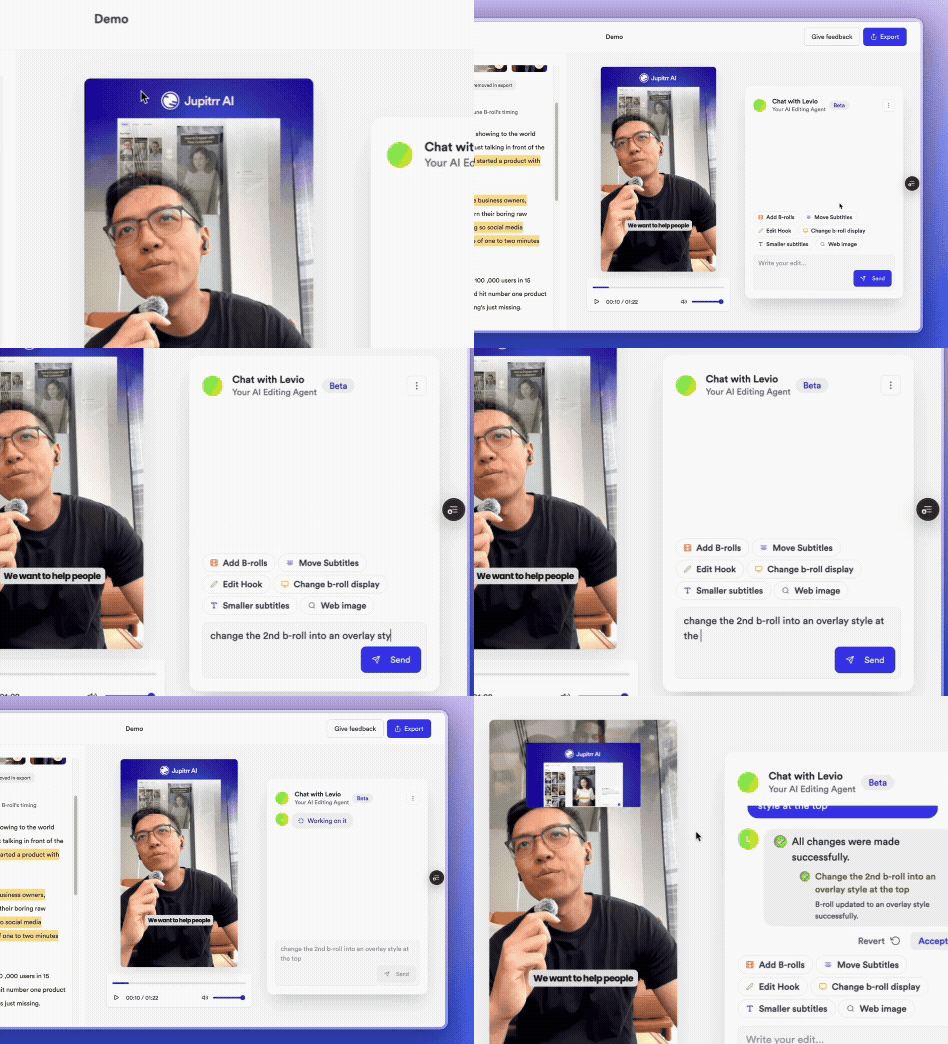
Demo: Using Levio to edit videos with natural language commands
Levio vs. Other Editing Options
| Feature | Levio | Traditional timeline Editing |
|---|---|---|
| Control surface | Natural-language chat | Mouse + keyboard |
| Learning curve | Minutes | Weeks |
| Revision workflow | Type "Change first broll" → instant preview | Ripple-trim, ripple-delete, re-render preview |
| Automation depth | Built-in AI suggests B-roll, music, etc. | Mostly manual; automation via plug-ins or macros |
| Setup & hardware | 100% browser-based; runs on modest laptops/Chromebooks | Native install; prefers multi-core CPU, dedicated GPU, lots of RAM |
FAQs
What exactly is Levio?
Levio is the chat-driven editing agent inside Jupitrr AI that lets you transform a video by typing natural-language commands, e.g. "remove the first broll", instead of dragging clips around a timeline.
How do I get access?
Simply sign in to your Jupitrr dashboard and upload your video. Free users may see a short wait-list while beta seats roll out.
Ready to try Levio?
Experience the future of AI-powered video editing with natural language commands.
Get Started Free