🎬 Video Editing Guide
How to Add Dynamic Subtitles to Your Video
⚡
TL;DR
Dynamic subtitles improve your watch-time of your videos. The easiest way to add Dynamic subtitles to your video is by uploading it to Jupitrr AI and selecting a preset to find the best style.
🎯
What are Dynamic Subtitles?
Instead of plain old text that just pops on and off, each word lights up right when it's spoken so it is highlighted put more weight on the keywords. Jupitrr AI handles the timing, animation, and styling for you. All you do is upload your video and select the preset.
What do Dynamic Subtitles look like?
Dynamic subtitles highlight keywords in your video. Here is an example of what they look like:

🚀
Why do dynamic subtitles matter?
Creators who add on-brand, auto-timed captions see higher watch-time, better retention, and wider global reach plus they stay on the right side of accessibility rules. Jupitrr AI makes the whole process a one-click affair, so you spend more time creating video than editing it.
Step-by-step guide to add Dynamic Subtitles to your video
1
Upload your video to Jupitrr AI
After you sign up/login, go to "Create" and upload your video.

2
Select a Preset
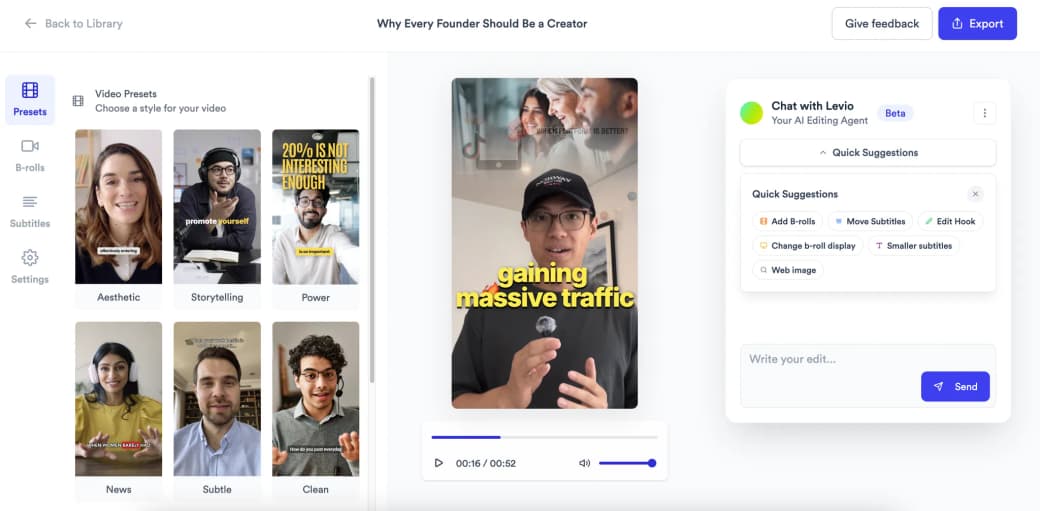
Once you upload your video, you can select from multiple presets. Each preset features a different dynamic subtitle style. AI will add dynamic subtitles to your video automatically, looking like the screenshot above.
3
Finetune
You can use Levio (chat-to-edit) to finetune your video. You can ask it to remove dynamic subtitles, add B-rolls, change subtitle positioning, etc.
4
Export
Now simply click on the export button and download your video
❓ Frequently Asked Questions
FAQs
QSubtitles vs. Dynamic subtitles - what's the difference?
Plain subtitles are static lines of text that simply turn on and off. Dynamic subtitles add motion, branding, and per-word highlights, all with one click in Jupitrr AI.
QDo dynamic subtitles hurt SEO?
Nope. If anything, they help. Search engines read the on-page transcript and JSON-LD metadata.
QCan I switch fonts and brand colours?
While we don't allow font changing right now, you can change the presets to find different styles dynamic subtitles.
🎬
Ready to add dynamic subtitles to your videos?
Start creating engaging videos with dynamic subtitles today using Jupitrr AI.
Get Started Now